Terminal
Positions
Review every fill on the Positions page — remaining size, bought and sold, live PnL, and one-click percentage sells.
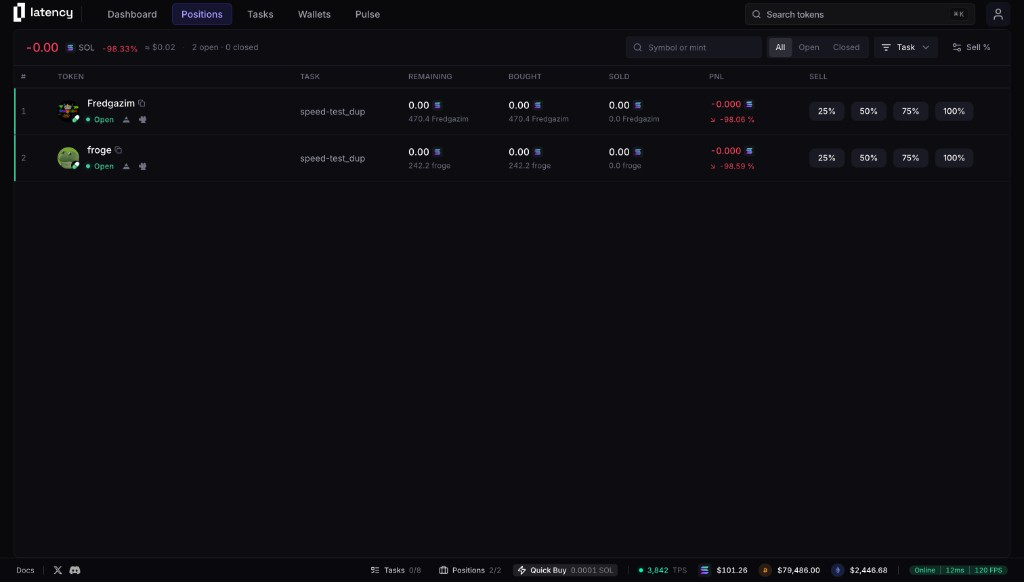
The Positions page
Open Positions from the top nav. Every QuickBuy and task fill lands here — bags you can still sell, and closed ones you can share or remove.
The header shows combined PnL in SOL and percent, an approximate USD value, and how many rows are open vs closed. Controls on the right search and filter the table.
Find a position
- Symbol or mint — type a ticker or paste a contract address.
- All / Open / Closed — Open still has tokens left. Closed is fully sold.
- Task — narrow to a specific task, or to QuickBuy fills.
Reading the table
Each row is one position. Amount columns show SOL on top and token size underneath. Click the row or the token avatar to open the chart.
Token
Avatar, ticker, and Open or Closed status. Click the name to copy the mint. Links under the status go to Axiom and GMGN, and to Pump.fun when the token launched there. Test-mode fills show a Test badge.
Task
The task that opened the position, or QuickBuy if you bought from search or Pulse.
Remaining
What's still in the bag — current SOL value and unsold token amount.
Bought
Total SOL spent and tokens received.
Sold
SOL received from exits and tokens already sold.
PnL
Profit or loss in SOL and percent. Green is up, red is down.
Sell
Four percentage buttons on open positions. Closed rows swap those for Share. Hover a desktop row to reveal delete.
Percentage sells
On an open row, click 25%, 50%, 75%, or 100% to sell that share of remaining tokens. Change those four values from Sell % in the header — each must be between 1 and 100. Reset restores the defaults.
A percentage sell uses remaining size. 50% sells half of what you still hold, not half of what you originally bought.
Closed positions
When a position is fully sold, the sell buttons become Share. Generate a PnL card, then copy or download the image. Delete removes the row from the table — it does not send a sell.