Automation
AFK
Snipe launches from the AFK tab — pick platforms, then open Social, Volume, CEX, Dev, and Holders filters. The cloud engine keeps watching after you close the tab.
Create an AFK task
- 1
Open Tasks
Go to Tasks and click New Task. Pick the AFK module.
- 2
Set size on General
Name the task, assign a wallet, and set SOL amount, slippage, and fees.
- 3
Configure the AFK tab
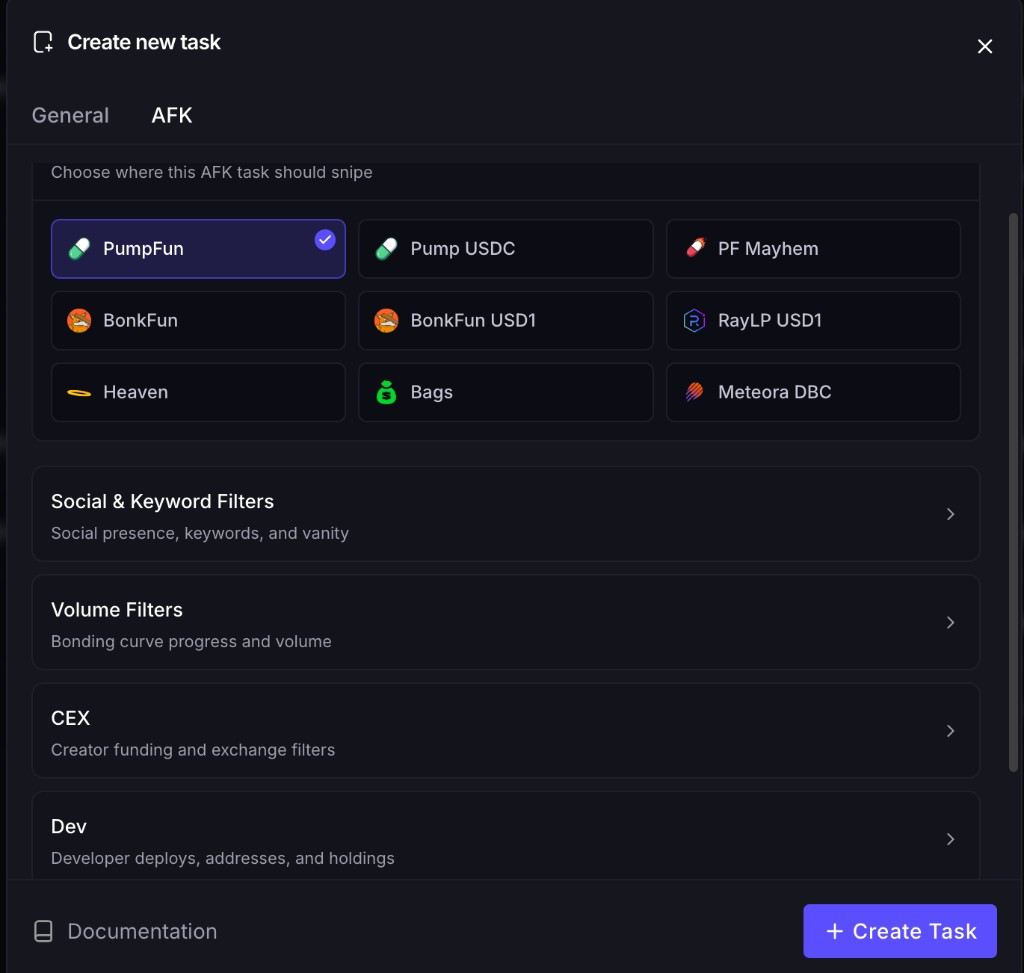
Choose launchpads and open the filter groups you need. PumpFun is selected by default. At least one platform is required.
- 4
Create Task
The task starts on the cloud engine immediately. Close the browser — it keeps watching.
Platforms
Choose where this AFK task should snipe. Select several, or use Select all / Deselect all.
- PumpFun — on by default
- Pump USDC
- PF Mayhem
- BonkFun
- BonkFun USD1
- RayLP USD1
- Heaven
- Bags
- Meteora DBC
- StonkFun
Filter groups
Four groups sit under the grid. Scroll for a fifth — Holders. Leave a group closed and its fields empty to ignore that filter.
Social & Keyword
Require Twitter, Telegram, a website, or any social. Include or exclude name and ticker keywords. Match Twitter or website URL keywords and vanity mint suffixes. Unique ticker and unique name skip repeats from the last 24 hours. Skip multi-buy bundles.
Volume
Min and max bonding curve progress. Optionally require min SOL volume and min txn count inside a time window (seconds).
CEX
Require creator funding from Binance, Coinbase, KuCoin, Kraken, Crypto.com, MEXC, or Robinhood — or paste custom addresses. Set min and max funding amount.
Dev
Min/max deploys and migrations. Allowlist or blacklist deployer addresses. Filter on the dev's initial buy (SOL) and holding %. Advanced: buy when the dev sells, skip non-pump contract addresses, require compute-unit instructions on the mint.
Holders
Min/max unique holders. Min buy size with a max occurrence cap. Min unique purchases, min SOL left in the buyer wallet after the fill, max % held by holders, and max buys per holder.
Empty filters are not a safety net. If every group is blank, the task snipes every launch on the platforms you selected.
Include vs exclude
Name and ticker keywords are comma-separated. Include means the token must match. Exclude means skip it if it matches.
Cloud execution
AFK tasks watch your selected platforms 24/7. When a launch matches, the cloud engine buys — often in the same block, without the round trip of clicking buy on a terminal.